Published on
December 30, 2025
by
QuillBot.
Revised on
March 17, 2026
Let’s face it—in today’s digital age, you’re probably signing more digital documents than paper ones. Signing a PDF or online document generally requires a digital signature, but trying to sign with your computer mouse usually results in something that looks less like handwriting and more like chicken scratch.
Often, the best option to create a polished, professional digital signature is to upload a scan or photo of your handwritten signature. However, this comes with its own problem: the background of your handwritten signature will likely be a clunky-looking white or off-white box that may block other elements on the form.
Fortunately, tools like QuillBot’s AI-powered background remover let you remove that pesky white background from your signature with ease. Read on to learn more about creating a beautiful, background-free signature in seconds.
Published on
December 30, 2025
by
QuillBot.
Revised on
March 17, 2026
An unwanted white box around an image can make your slides look unpolished and unprofessional. However, removing the background from an image can be a confusing and painstaking process.
Tools like QuillBot’s AI-powered background remover simplify the process of removing the background from an image. Read on to learn how to use a background remover to create sleek slides in seconds.
You’ve just captured the perfect photograph, but then you notice it: a stranger walking through the frame, a random tourist in the background, or perhaps even a child you don’t have permission to include in your image. Suddenly, your photo feels less personal, less shareable, and less perfect.
Until recently, removing people from photos required advanced editing skills and expensive software. For everyday users, that meant settling for a flawed image or awkwardly cropping out parts of the photo to hide distractions.
Today, it’s faster and easier than ever to remove people from photos. Whether you need to remove someone from a photo to protect privacy or clean up your vacation pictures, QuillBot’s free photo editor makes the process effortless. In just a few clicks, you can transform a cluttered scene into a polished image that looks exactly how you want.
Published on
December 27, 2025
by
QuillBot.
Revised on
February 9, 2026
The New Year is a time for celebration and connection. Whether you’re looking to reach out to a coworker or client, send a thoughtful card to a loved one, or craft a cute message for a social media post, we’ve got you covered with ideas to start 2026 on a high note.
Word cloud generators are tools that allow you to create word clouds, or text visualizations where the size of each word reflects how often it appears.
There are tons of online tools for creating word clouds. Here, we break down some of the best free options, including QuillBot’s word cloud generator and other online tools.
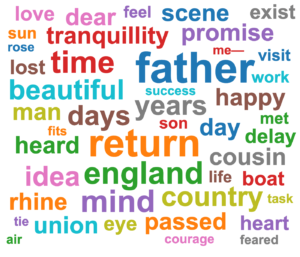
Below is a word cloud generated from the first chapter of Mary Shelley’s Frankenstein:
Frankenstein word cloud from QuillBot’s word cloud generator
Published on
December 23, 2025
by
QuillBot.
Revised on
March 11, 2026
Giving a presentation is often your critical chance to get the grade, pitch an idea, or close a deal. But creating the perfect slide deck can take ages. Here, we’ve provided some stellar slide examples to help you ace your next presentation.
If you’re especially crunched for time, skip the hours fussing over slide design and layout with QuillBot’s free AI presentation maker. Simply describe your content and how many slides you’d like to include, pick your design, and create a presentation-ready deck with the click of a button.
Some photos are too good to use just once. Turning them into WhatsApp stickers lets you reuse your favorite reactions, faces, and moments anytime you need them. That’s why learning how to make WhatsApp stickers from photos has become so popular. It’s a fun and easy way to personalize every chat.
The only thing standing between a great photo and a great WhatsApp sticker is the background. Once you remove it, turning a photo into a clean, sticker-ready image is surprisingly simple. With QuillBot’s background remover, turning your favorite photos into WhatsApp stickers has never been easier.
Keep reading to discover why photos make such great WhatsApp stickers and how to use QuillBot’s free online tool.
Published on
December 19, 2025
by
QuillBot.
Revised on
March 13, 2026
AI photo and picture generators make it possible to turn a few words into fully formed photos, illustrations, and graphics in seconds. Whether you’re creating social media content, blog visuals, product mockups, or just experimenting for fun, the key to using tools like QuillBot’s free AI image generator is how you write your prompts.
In this guide, we’ll walk through the basics of how to create an AI image and show you how to put it all into practice using QuillBot’s photo generator.
Published on
December 16, 2025
by
QuillBot.
Revised on
March 17, 2026
The easiest way to add a solid white background to a photo is to use a tool that handles the editing for you. A clean white backdrop can make product shots look polished, help profile photos stand out, and give marketing visuals a more professional, studio-ready feel—all without any manual masking or layering.
QuillBot’s free background remover can replace any background with a solid white one in seconds, right in your browser, and with no editing experience required.
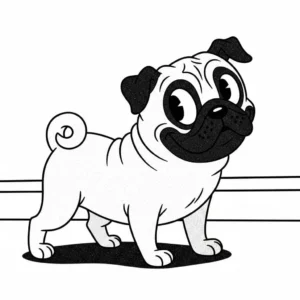
An AI cartoon generator uses advanced AI models to transform text descriptions into high-quality cartoon art. By interpreting an AI prompt, the generator can produce anything from playful characters and whimsical animals to dynamic action scenes. You don’t need professional illustration skills or fancy illustration software, just your imagination, some basic knowledge of cartoon styles, and a great prompt.
In this guide, you’ll learn how to choose a cartoon style, how to write effective text-to-cartoon prompts, and how to use QuillBot’s free AI cartoon generator.
AI cartoon generator exampleAI prompt: Adorable pug with large, expressive eyes and a happy smile, retro grainy texture, rubber hose vintage cartoon style, simple and cheerful mood